
Solo: Your Gig Business App
WorkSoloBusiness
4.21.16K Reviews
- Version
- 6.0.5
- Installs
- 500.00K
- Age Rating
- Everyone
Screenshots

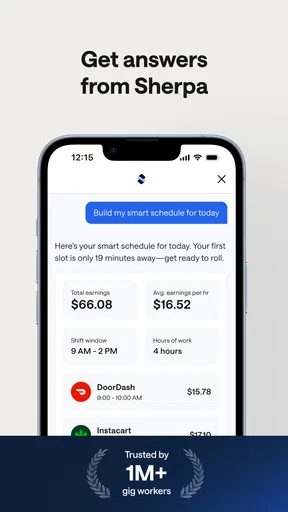
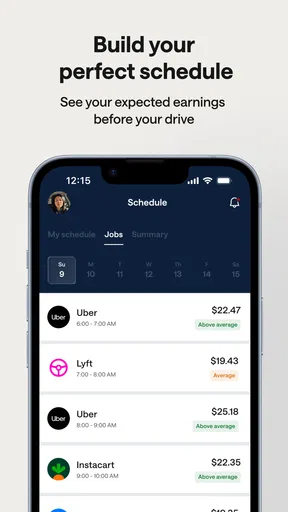
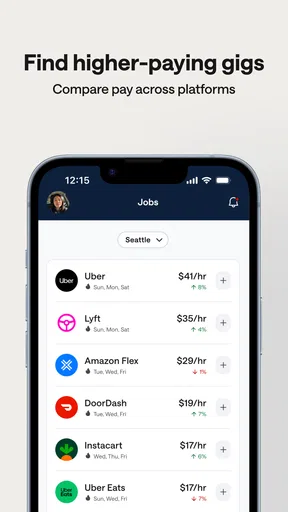
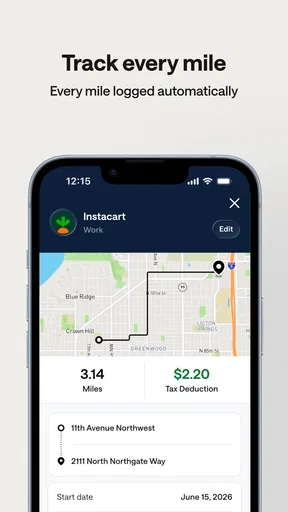
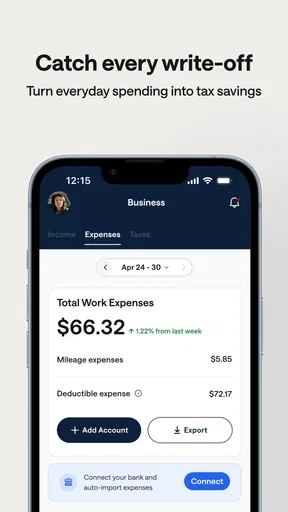
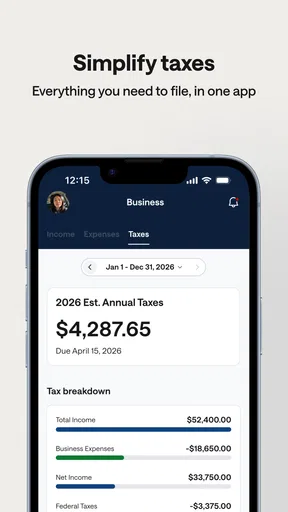
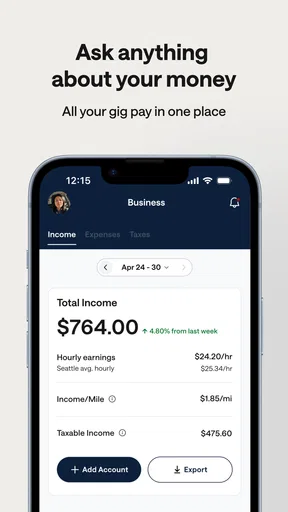
Our Review of Solo: Your Gig Business App
 Analysis by Appyee
I approach Solo: Your Gig Business App as a work organizer for people whose income comes from several gigs rather than one tidy paycheck. That focus is useful, but it also raises a practical question: does putting gig work in one place make the day easier to manage? In my view, the strongest reason to consider Solo is the chance to see work and money together, instead of piecing the picture together from separate apps, notes, and bank activity.
A clearer view of work, with a few questions to test
Solo is a free business app from WorkSolo, with optional in-app purchases ranging from $0.99 to $200.00 per item. It has an average rating of 4.3 from around 7,100 ratings, and more than 500,000 installs. Those figures suggest it has found an audience among independent workers, but they can’t tell you whether its approach fits your particular mix of jobs. I’d treat it as a tool to try against your own routine, not as a substitute for checking whether its features match the way you actually earn.
The practical decision is whether you want a central view of multiple income streams or prefer to keep each platform’s records separate. A rideshare driver who also takes delivery shifts may value a consolidated overview; someone with a single steady freelance client may already have a simple bookkeeping method that works. Solo is most compelling when scattered information is the problem. It is less compelling if you want a full accounting system or expect one app to make business decisions for you.
Readability and navigation in everyday use
The original experience feels approachable rather than built for accountants. The earlier impression of a user-friendly layout matters here: a gig worker often needs to check a number between jobs, not spend an evening learning a complicated interface. The app’s appeal depends on being able to return to useful information without turning routine tracking into another project. I would still take a few minutes at the start to learn where earnings, expenses, and projections live, then keep the same habit so the overview remains meaningful.
Customization is especially useful when your work does not fit one standard pattern. Before relying on a projection, I’d make sure the gigs you use and the way you record their income are represented consistently. A prediction is only as helpful as the information behind it; irregular shifts, delayed payouts, or a quiet week can make a forecast feel more certain than real life. I’d use projections as a planning aid, not as a promise of what will land in my account.
For a realistic example, imagine finishing a delivery shift, then checking whether a freelance payment has arrived before deciding to accept another block of work. A combined view can help you compare what has been earned with what you expect, while still leaving the final choice to you. That is a more useful role for Solo than treating it like an automatic answer to “Which gig should I take?” The app can help organize the decision; your schedule, expenses, and energy still matter.
Motor and sensory considerations
Gig work happens in noisy, rushed places: on a break, between appointments, or while waiting for a pickup. I would avoid entering figures while driving or walking through traffic; the safer routine is to pull over or wait until you are settled. For people who find frequent tapping uncomfortable, batching expense notes and income checks into a quiet pause may be less tiring than opening the app after every small transaction.
Receipt photos can reduce typing, which may help when a long description is awkward to enter on a phone. But a photo-based step is not automatically effortless: glare, a crumpled receipt, or poor lighting can make capture inconvenient, and you may still need to check that the expense is recorded correctly. I’d keep the original receipt until I can see that the entry is complete, especially for a larger business purchase. That small verification habit is more dependable than assuming every quick capture needs no follow-up.
Solo is rated for Everyone and is listed for devices running Android 8.0 or later. That gives prospective Android users a useful compatibility starting point, though the age label is not a statement about accessibility. If larger text, screen-reader behavior, color contrast, or one-handed navigation is important to you, check how the current version works with your own device settings before making it central to your bookkeeping. Comfort can vary with both the phone and the person using it.
Access across different work situations
Bank linking can reduce manual work by tracking deposits, while receipt capture and expense categories can help make spending easier to review later. The trade-off is that automation asks you to trust a connection between your financial activity and the app. I’d decide whether that convenience is worth it for me, review what is being recorded, and continue comparing entries against my bank activity. If I preferred not to link an account, I would first check whether manual tracking still supports the workflow I need rather than assuming the connected option is essential.
For workers who divide their time among platforms, a central record can be handy when a deposit arrives separately from the shift that earned it. One practical tip is to note the work period or gig alongside an entry whenever the app’s available workflow allows it; that makes later review more useful than a bare total. Another is to check expenses regularly instead of waiting until tax season. The app’s organization may reduce the end-of-year scramble, but it does not remove the need to review records or make sure a purchase is categorized appropriately.
The community and market-trend elements may be most useful as context, particularly for someone new to gig work and trying to understand how others think about the field. I would treat shared tips as ideas to evaluate, not personal financial advice, and market signals as one input rather than a command to switch platforms. Local demand, personal costs, and the hours you can work can change what is worthwhile for you. A trend that looks encouraging in general may not fit your own route, clients, or schedule.
Where the convenience has limits
Compared with using each gig platform’s own dashboard, Solo’s central approach can save you from jumping between separate views, but those original dashboards may still be the best place to verify a shift, payout, or platform-specific detail. Compared with a spreadsheet, Solo offers a more app-centered way to track activity, while a spreadsheet gives you more freedom to design columns and calculations yourself. A dedicated bookkeeping tool may suit someone who needs deeper accounting workflows. The right choice depends on whether your biggest pain is fragmentation, customization, or formal financial reporting.
There is also a sensible boundary between organizing records and handling every part of a business. Receipt capture and categorized expenses can help keep information together, but I would not assume that a tidy list automatically settles tax questions or replaces professional guidance. Likewise, projections can support budgeting without guaranteeing future earnings. Keeping those limits in mind makes the app more useful, because it encourages you to treat its summaries as a working view rather than unquestionable truth.
The optional purchases deserve a little attention before you commit to a paid feature. The app is free to start, but individual in-app items can range from under a dollar to two hundred dollars. I’d check what a purchase actually unlocks and whether it addresses a problem I have, rather than paying simply because an upgrade is offered. If basic tracking already makes my routine easier, there may be no reason to spend; if a paid option is central to my workflow, I’d weigh its cost against the time or effort it saves.
A fit for some workers, not every business
I’d recommend trying Solo if you earn across several gigs, want a clearer view of income and expenses, and are comfortable reviewing records on your phone. It may also suit a newer freelancer who wants a practical starting point for noticing deposits and keeping receipts together. The main benefit is not that it eliminates business admin; it is that it can make the scattered parts easier to see and revisit.
I’d be more cautious if you have a single client and already maintain accurate records with little effort, if you need detailed accounting controls, or if you do not want work and financial information brought into another app. It may also be the wrong choice if the current interface does not work comfortably with your accessibility needs. In those cases, a basic spreadsheet, the gig platforms’ own records, or a fuller bookkeeping product may be a better match. There is no prize for using an all-in-one tool when a simpler setup serves you better.
Keeping Track of Your Hustle
First off, Solo: Your Gig Business App is all about making life easier for gig workers. You know how it is—juggling different gigs can sometimes feel like herding cats. This app acts as a one-stop shop for managing all your work. From tracking your hours to calculating your income, Solo has got you covered.
What I loved is the intuitive interface. It’s super user-friendly, which is a relief because who has time to wrestle with a complicated app? Everything is laid out in a way that makes sense, and you can customize it to fit your specific gigs. Whether you’re driving for a rideshare company or delivering food, Solo adapts to your needs.
Income Tracking and Projections
One of the standout features is the income tracking and projection tool. This is a game changer, folks. It not only lets you log your earnings but also gives you a heads-up on future income based on your current gigs. It’s like having a crystal ball for your finances, and for someone who likes planning ahead, this is pure gold.
Plus, you can link your bank account to the app, allowing it to automatically track your deposits. It’s seamless and saves a ton of manual input time. I mean, who doesn’t love a little automation?
Expense Management Made Easy
Another thing that’s worth mentioning is how Solo handles expenses. Keeping track of expenses can be a nightmare, but this app simplifies it. You can snap photos of your receipts and log them instantly. The app categorizes them for you, making tax season a breeze. Trust me, when tax time rolls around, you’ll be thanking Solo for keeping everything organized.
Community and Insights
Solo also has a community feature, which is pretty cool. It connects you with other gig workers, allowing you to share tips and experiences. This can be super helpful, especially if you’re new to the gig economy and looking for some insider advice.
On top of that, the app provides insights into the gig market trends. It’s like having your finger on the pulse of the gig economy, helping you make informed decisions about which gigs are worth your time.
Security and Privacy
Let’s talk security for a second. In a world where data breaches are all too common, Solo takes your privacy seriously. It uses bank-level security to protect your information, which gives me peace of mind. Knowing that my financial data is safe allows me to focus on what really matters—my work.
And, if you’re worried about data sharing, Solo doesn’t sell your data to third parties. It’s refreshing to find an app that respects your privacy in a world where data is currency.
The Verdict
All in all, Solo is a useful option for anyone navigating the gig economy who wants work details, income, and expenses gathered in one place. Its current version is 5.3.1, and the combination of projections, deposit tracking, receipt capture, community, and market insights gives it a broader scope than a plain earnings log. I’d still treat its forecasts as estimates and its records as something to review, but the overall idea is practical when multiple sources of work make your finances hard to follow.
If you’re a freelancer or gig worker, give Solo a try. It might just become your new best friend. After all, anything that makes managing gigs a little less stressful is worth checking out, right?
An inclusive verdict
My overall take is that Solo’s all-in-one approach can reduce the mental load of switching between gig records, especially when you make a small, consistent habit of checking entries and correcting anything that looks off. That is also the key to getting value from it: the app can organize information, but it cannot make irregular work predictable or decide what is financially right for you. I would start with the parts that solve an immediate hassle, then see whether the broader tools earn a place in my routine.
For different abilities and working contexts, the most helpful feature may be less about any single screen and more about having fewer places to check. At the same time, connected finances, phone-based interaction, and visual receipt capture may not suit everyone equally. I’d test the workflow on my own device and in the situations where I actually work, then choose Solo only if it feels comfortable and trustworthy in practice. That makes it a promising organizer for many gig workers, but not a universal replacement for their preferred records or bookkeeping setup.
Verdict
Strengths of Solo: Your Gig Business App
- User-friendly interface design.
- Comprehensive invoicing features.
- Real-time booking management.
- Secure payment integration.
- Customizable notifications.
Limitations of Solo: Your Gig Business App
- Limited free version features.
- Occasional sync issues.
- No offline mode available.
- Limited third-party integrations.
- Steep learning curve for beginners.
Similar Picks in This Category
View All
LinkedIn: Community & Network
LinkedIn3.8

Zoom Workplace
zoom.com4.1

Microsoft Teams
Microsoft Corporation4.6

Meta Business Suite
Meta Platforms, Inc.4.6

Webex Meetings
Cisco Systems, Inc.4.5

TeamViewer Remote Control
TeamViewer4.4
Frequently Asked Questions
What is Solo: Your Gig Business App?
Solo: Your Gig Business App is a comprehensive tool designed to help gig workers manage their business efficiently. It offers features like income tracking, expense management, and tax estimation, making it easier for freelancers and independent contractors to handle the financial aspects of their work.
Is Solo available for both Android and iOS devices?
Yes, Solo: Your Gig Business App is available for download on both Android and iOS platforms. You can find it on the Google Play Store for Android devices and the Apple App Store for iOS devices, ensuring accessibility for a wide range of users.
How does Solo help with tax management?
Solo provides tools to estimate taxes based on your income and expenses, helping you set aside the right amount for tax payments. It tracks deductible expenses and generates reports that simplify the process of filing taxes, ensuring you maximize your deductions and stay compliant.
Can Solo integrate with other apps and services?
Yes, Solo is designed to integrate with various financial services and platforms. This includes popular payment services and accounting software, allowing you to seamlessly import data and manage your finances from a single, unified interface, enhancing overall productivity and accuracy.
Is there a cost to use Solo, and what are the pricing options?
Solo offers a free version with basic features and a premium subscription with advanced functionalities. The premium version provides additional tools such as enhanced reporting and personalized financial advice. Pricing details can be found on their website or within the app itself, helping you choose the best plan for your needs.
